Connectors
A connector is a saved connection to one of your databases. Everything you build in InfiniStack starts from one.
What a connector is
A connector stores the details InfiniStack needs to reach a database: where it is, which database to open, and the user to sign in with. You add and manage connectors on the Connectors page, in the Data part of the sidebar.
You need the Integrator or Admin role to open the Connectors page and to add, change, test or delete a connector. Members can't. See Roles at a glance.
Until your organization has at least one connector, these areas show a page that asks you to connect your data instead of their content:
- Data Pipelines
- Workflow Studio
- Chat with AI
- Reports
- Metrics
- Data Models
- Business Knowledge
- Schema Intelligence
The heading on that page depends on the area, for example Connect your data to get started in Data Pipelines. Select Connect a data source on that page to add your first connector.
Your organization may have a maximum number of connectors. When you reach it, adding another one fails with Organization connector limit reached, followed by the current count and the maximum.
Deleting a connector also deletes everything built on it: pipelines, data models, workflows, metrics, chat conversations and other linked resources. See Edit or delete a connector.
Sources and destinations
A connector can be a source that InfiniStack reads data from, a destination it writes data to, or both. You don't choose this yourself. The connector type you pick decides it.
Supported databases
You can connect these databases:
| Database | Default port |
|---|---|
| PostgreSQL | 5432 |
| MySQL | 3306 |
The types you see when you add a connector are the ones your platform administrator has made available. If none are, the page shows No connectors available.
Connection health
Each connector on the Connectors page shows a health status:
| Status | What it means |
|---|---|
| Connected | The last connection test succeeded. |
| Degraded | The connector needs a look. Test the connection again to update its status. |
| Connection failed | The last connection test failed. Fix the connection details and test again. |
| Checking… | A connection test is running. |
The status comes from the last time you selected Test connection for that connector on the Connectors page. A connector you haven't tested there shows Connected. Saving changes to a connector resets its status to Connected. Next to the status, the row shows when it was last tested, or when it was last saved if it hasn't been tested, such as Checked 5 min ago.
The chips at the top of the list count your connectors: Connectors shows the total, and Healthy, Degraded and Needs attention appear when at least one connector has that status. Select a chip to show only those connectors. Select it again to show all of them.
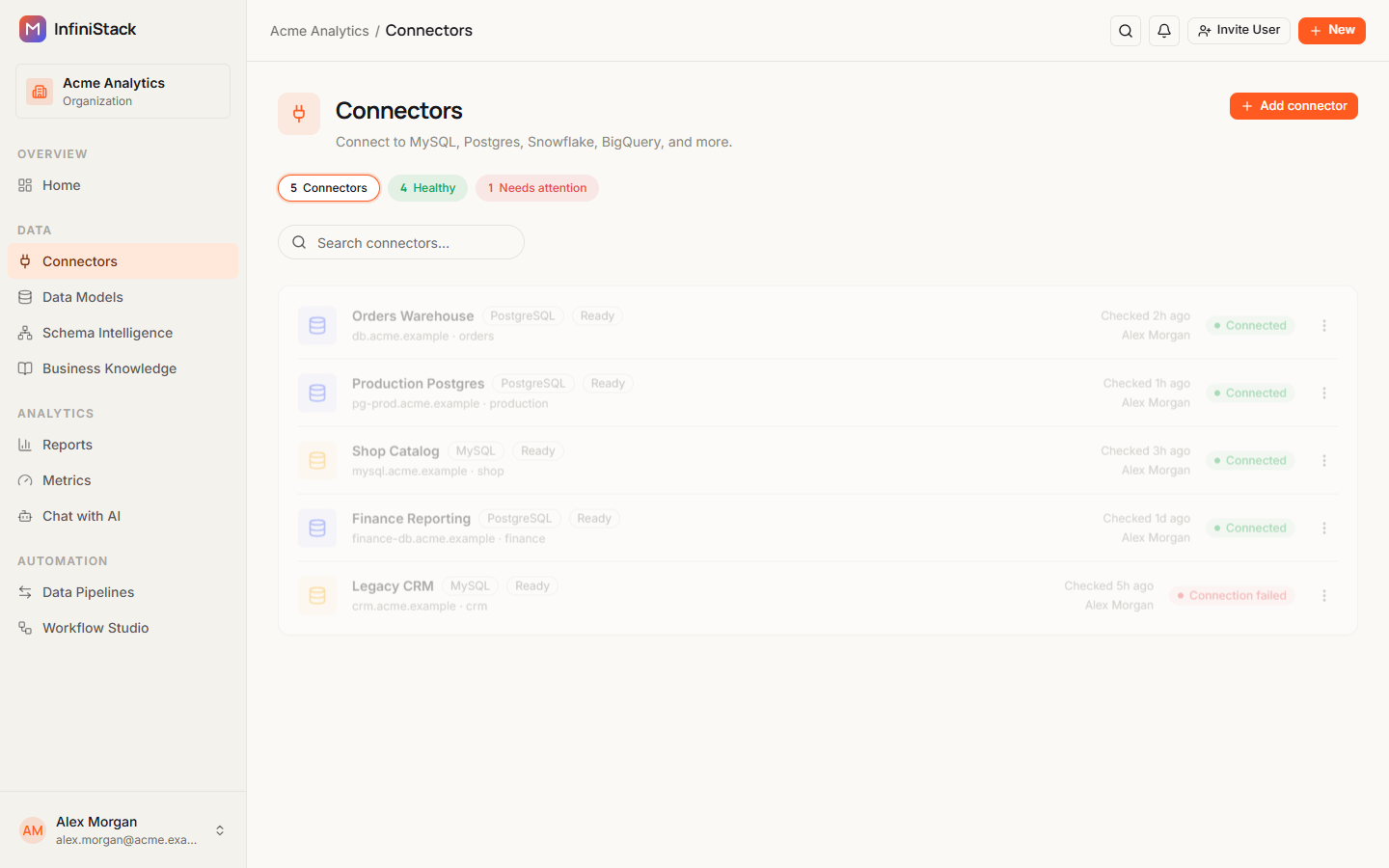
Some connectors also show a setup badge next to their type:
| Badge | What it means |
|---|---|
| Ready | The connector is set up and ready to use. |
| Pending install, Installing | InfiniStack is still setting it up. |
| Install stale | InfiniStack needs to set the connector up again, for example after its connection details changed. It does this automatically. |
| Install failed | Setup failed. Hover over the badge to see the error. |
Guides
Add a connector
Connect a database as a source or destination.
Explore your data
Browse the schemas, tables, and columns behind a connector.