Roles at a glance
Everyone in an organization has a role, and that role decides which parts of InfiniStack you can open. The docs follow the same split: some pages are for everyone, and some only apply if your role can use the feature.
The four roles
Everyone in an organization has one organization role:
| Role | Who usually has it | What you can do |
|---|---|---|
| Member | Most people in the organization | Use Home, ask Chat, and open the reports shared with you |
| Integrator | Data engineers and analysts | Connect sources, build pipelines, define metrics, and build reports and workflows |
| Admin | The person who created the organization, and anyone they promote | Everything an Integrator can, plus manage members, teams, invitations, billing, and usage |
The fourth role, Team Lead, is a role inside a team. See Teams and team leads.
Not sure which one you have?
Open the Organization page in the app. It shows your organization role.
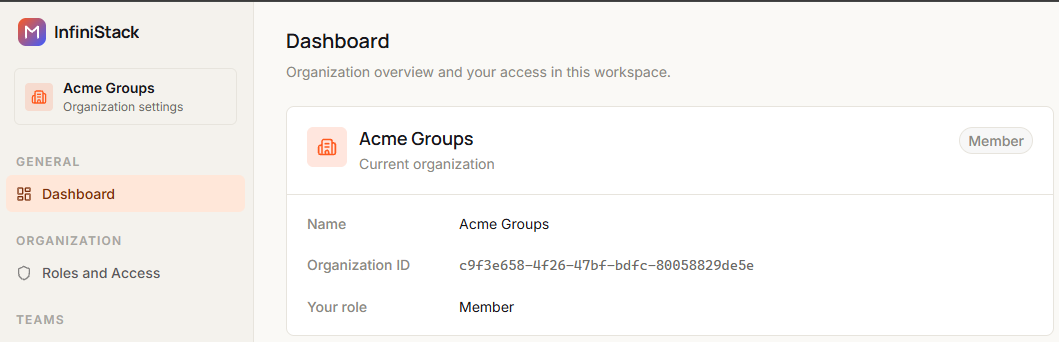
You can also tell from the app's sidebar. It only shows the areas your organization role can open.
- Home, Reports, and Chat with AI only: you're a Member.
- Connectors, Metrics, Data Pipelines, and Workflow Studio as well: you're an Integrator or an Admin.
- Organization settings include member management, invitations, and billing: you're an Admin.
If you need access you don't have, ask an Admin in your organization to change your role. Only Admins can change roles.
What each role can do
| Feature | Member | Integrator | Admin |
|---|---|---|---|
| Chat with AI | ✓ | ✓ | ✓ |
| Reports: find and view | ✓ | ✓ | ✓ |
| Reports: build and publish | ✓ | ✓ | |
| Connectors | ✓ | ✓ | |
| Schema Intelligence and Business Knowledge | ✓ | ✓ | |
| Metrics | ✓ | ✓ | |
| Data Pipelines and Workflow Studio | ✓ | ✓ | |
| Members & invitations, Teams, AI controls | ✓ |
Teams and team leads
Team Lead isn't an organization role. It's a role inside a team, on top of your organization role. Any Member, Integrator, or Admin can be the Team Lead of a team, and a Team Lead manages that team's members.
Being a Team Lead doesn't change what else you can open. A Member who leads a team still can't connect data or build pipelines; an Integrator who leads a team keeps all their Integrator access.
To see whether you lead a team, open Teams in organization settings. See Teams & Common Spaces.
Features that need AI or a connector
Pages carry badges at the top:
- A role badge, such as Integrator+ or Admin, means the page needs that role or higher.
- An AI badge means the feature uses AI. If an Admin turns AI off in AI controls, it isn't available.
- A Needs connector badge means the feature only works after an Integrator or Admin has connected a data source.
Use View as in the top bar to choose your role. Pages you can't use are dimmed in the sidebar, so you can see at a glance which ones apply to you. Your choice is saved in this browser. The Team Lead option shows the Member pages plus the team pages, for a Member who leads a team.
The docs only dim pages. They don't control access. What you can actually open is decided by your role in the app.