Schema Intelligence
Schema Intelligence shows how InfiniStack reads the data in your connectors: which tables are ready to query, how tables join, where data flows from, and which tables Chat should query first.
What Schema Intelligence does
Open Schema Intelligence from the Data section of the app's sidebar, between Data Models and Business Knowledge. Integrators and Admins can open it. Members and team leads don't see it. See Roles at a glance.
InfiniStack builds the schema map for you. It runs automatically when you create a connector, and again when you change a connector's credentials. Each run works through these stages, in order:
| Stage | What it does |
|---|---|
| discover | Finds the tables in the connector |
| profile | Profiles the columns in each table |
| relate | Finds how tables join, within the connector |
| flow | Traces where each table's data comes from |
| describe | Writes a short purpose for each table |
| link | Matches the same entity across different connectors |
| embed | Indexes the tables so Chat can find them |
| draft | Drafts business objects for Business Knowledge |
| score | Updates the intelligence score |
Each run profiles, relates and describes up to 200 tables per connector.
Schema Intelligence never publishes Business Knowledge on its own. The draft stage only creates drafts for you to review.
The page has a toolbar and five tabs:
- Connector: show one connector, or All connectors.
- Layer: show All layers, or only Serving, Staging, Raw or Unknown tables.
- Refresh: reload what's on the page.
- Tabs: Overview, Relationships, Lineage, Query targets and Cross-source links.
If your organization has no connectors yet, the page shows Connect your data to unlock schema intelligence. Add a connector first. See Connectors.
Intelligence score and freshness
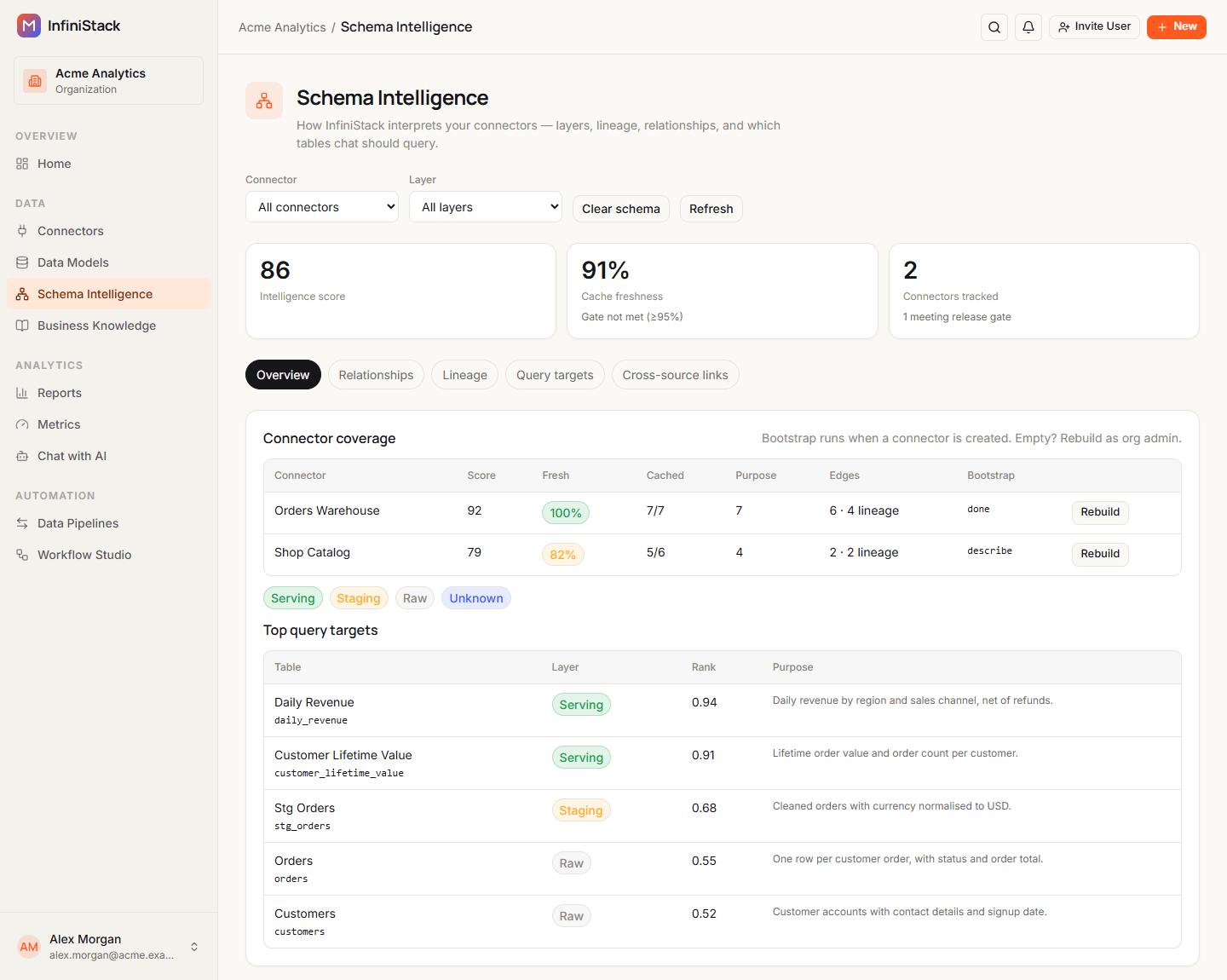
The top of the page shows three cards:
| Card | What it shows |
|---|---|
| Intelligence score | The average score of your connectors, from 0 to 100. It's 0 when you have no connectors. |
| Cache freshness | The average, across your connectors, of the share of each connector's tables that InfiniStack has read in the last 24 hours. Below it, Gate met (≥95%) or Gate not met (≥95%). |
| Connectors tracked | How many connectors are scored, and how many are meeting release gate. |
Each connector's score is out of 100:
| Part | Points |
|---|---|
| Tables read and up to date | 30 |
| Tables with a purpose | 25 |
| Columns profiled (target: 3 per table) | 15 |
| Relationships found | 10 |
| Lineage found | 10 |
| Tables indexed for Chat | 10 |
A connector meets the release gate when its freshness is at least 95% and its score is at least 40. Your organization meets the gate when at least 95% of its connectors have freshness of 95% or more.
The Overview tab lists each connector under Connector coverage:
| Column | What it shows |
|---|---|
| Connector | The connector's name |
| Score | Its intelligence score |
| Fresh | Its freshness, shown as a warning when the connector doesn't meet the release gate |
| Cached | Tables read, out of tables found |
| Purpose | Tables with a purpose |
| Edges | Relationships found, then lineage links |
| Bootstrap | done, the stage that's running, or —. A failed run shows its error here. |
If the list says No semantic health yet., add a connector or ask an Admin to rebuild one.
Layers, relationships and lineage
Every table gets a layer, which says how ready it is to query:
| Layer | What it means | How InfiniStack decides |
|---|---|---|
| Serving | Finished tables, ready for reports and Chat | Output of a transformation, data only flows in, or the name starts with dim_, fct_, mart_, rpt_ or agg_ |
| Staging | Tables in the middle of a flow | Data flows in and out, or the name starts with stg_, or contains tmp_ or _staging |
| Raw | Data as it arrived from a source | Loaded by a pipeline, data only flows out, or the name starts with raw_ |
| Unknown | Anything else | — |
InfiniStack checks the Serving rules first, then Raw, then Staging. The Overview tab shows a legend of the layer badges.
System tables, such as information_schema or tables starting with pg_, are never offered as query
targets.
The Relationships tab draws a Relationship graph of how tables join: foreign keys declared in your database, joins InfiniStack inferred, and the same entity found in two connectors. Drag a table to move it, and scroll or use the zoom in and zoom out buttons. Select Expand to fill the screen, and Collapse or Esc to go back. The graph shows up to 2000 links.
Under the graph, Link details lists every link: From table, From col, To table, To col, Kind and Confidence. Confidence is one of:
- declared: the database declares the key.
- inferred_high or inferred_low: InfiniStack inferred the join, with high or low confidence.
- manual: an Admin confirmed it.
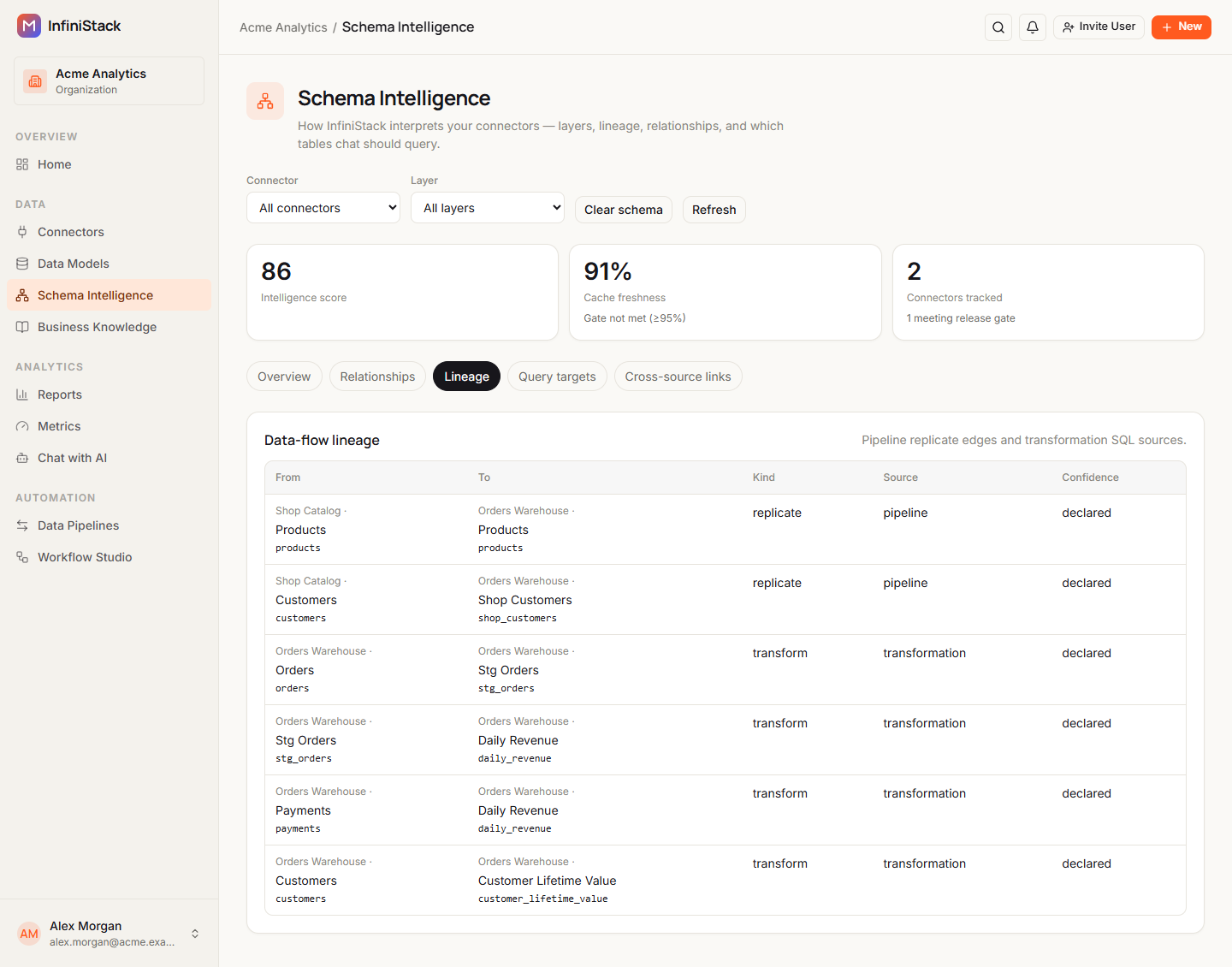
The Lineage tab lists Data-flow lineage: where each table's data comes from, with From, To, Kind, Source and Confidence. A replicate link comes from a pipeline, and a transform link comes from a transformation. The Lineage tab always lists lineage for every connector in your organization. The Connector and Layer filters don't change it.
Query targets
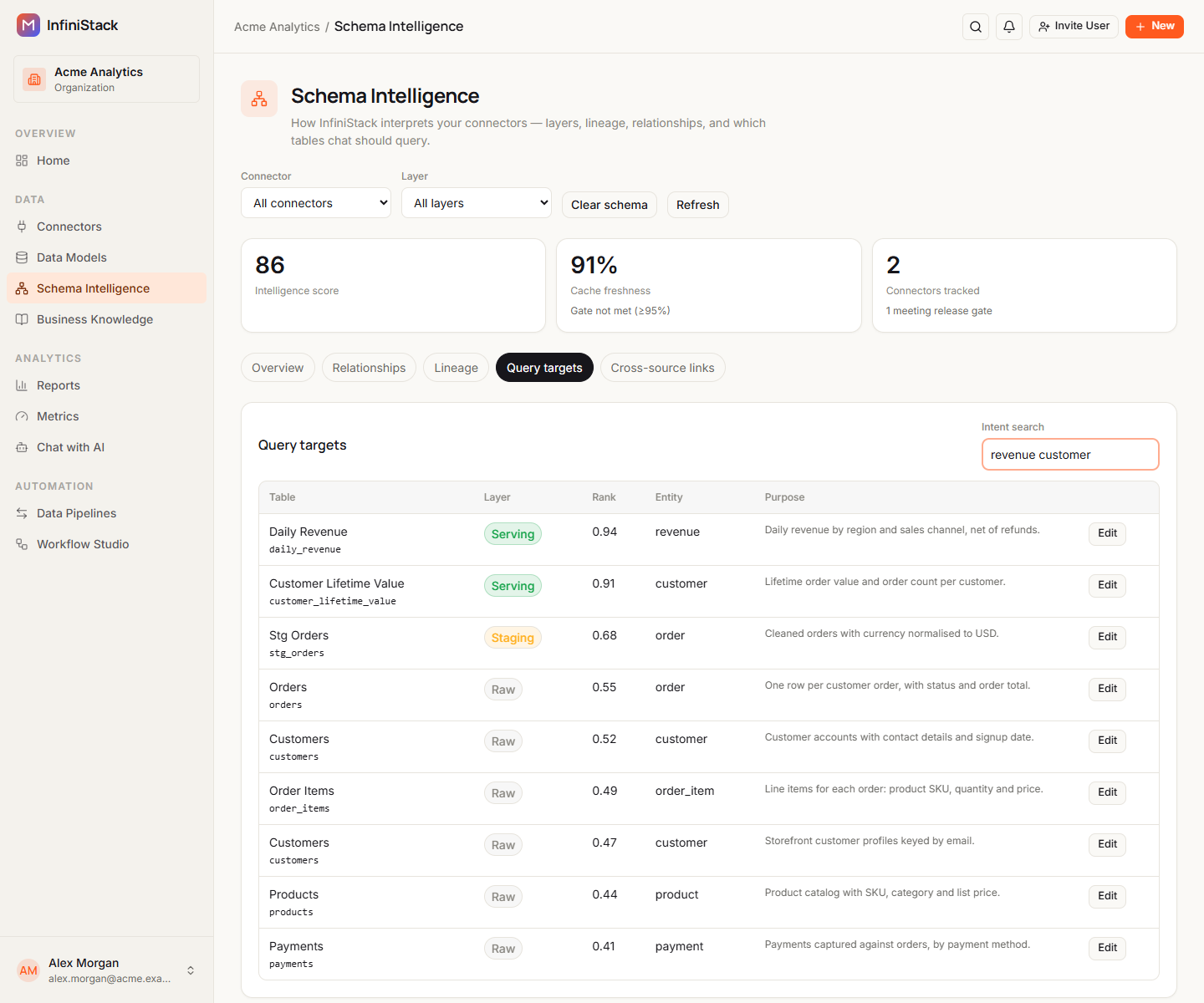
Query targets are the tables Chat should query first, ranked from most to least useful. The Overview tab shows the top 5 under Top query targets. The Query targets tab shows up to 40, with Table, Layer, Rank, Entity and Purpose.
Rank starts from the table's layer:
| Layer | Starting rank |
|---|---|
| Serving | 1.0 |
| Unknown | 0.6 |
| Staging | 0.3 |
| Raw | 0.2 |
Then InfiniStack adjusts it:
- +0.05 for more than 1,000 rows.
- +0.03 for 8 or more columns.
- -0.2 for a serving table that hasn't been updated for more than 3 days.
- A raw table's rank is at most 0.25. It's left out when a serving table covers the same entity.
To see which tables fit a question, type words in Intent search, for example revenue customer.
Separate words with spaces or commas. Each word that matches a table's name, purpose or tags adds 0.08,
up to +0.35. Tables that closely match your words in meaning can get up to +0.15 more. Rank never
goes above 1.5.
Guides
Integrators can view everything on this page. Only Admins see Rebuild schema, Clear schema, Edit and Confirm.
Review & correct the schema map
Check and fix what Schema Intelligence learned about your tables.